Man shares the 'great' 15 ChatGPT prompts that changed how he works
Published on Jan 20, 2026 at 1:05 AM (UTC+4)
by Keelin McNamara
Last updated on Jan 19, 2026 at 7:06 PM (UTC+4)
Edited by
Amelia Jean Hershman-Jones
This man has shared the ‘great’ 15 ChatGPT prompts that have improved his work life.
He claims that they have completely changed how he does his job on a daily basis.
He outlined the 15 ChatGPT prompts on Reddit.
The post quickly caught Redditors’ attention and went viral over the weekend.
DISCOVER SBX CARS: The global premium car auction platform powered by Supercar Blondie
Reddit user posts his top 15 ChatGPT prompts
By now, ChatGPT is a term that is likely very familiar to you.
For most of us, the tech has become a collaborator in everyday life.
But what is the most efficient and effective way of using it?
Well, one man thinks that he has the answer.
Reddit poster zmilesbruce took to the social media platform last weekend.
He explained that he uses ChatGPT for almost everything.
After over six months, he has collected ‘more than 500 prompts’.
But these are the 15 prompts that, according to the poster, are the most effective.
1. Explain Like I’m Smart
The first is called the ‘Explain Like I’m Smart’ prompt.
As the name suggests, it involves asking ChatGPT to explain something to someone unfamiliar with the topic at hand, but still smart.

The goal is not to dumb the information down – just to make it accessible.
And it works, according to the poster, because the answer respects your intelligence.
2. Critic Mode
Next up is a prompt called the ‘Critic Mode’.
The reason this works is that it forces brute honesty from ChatGPT.
The original poster explains that, “ChatGPT is too nice by default. This forces honesty.”
Asking the AI to review the content and be brutally honest can be very effective.
3. Expert Interview
Next up is the ‘Expert Interview’.
This prompt offers clear, structured guidance that is specific to preparation.
It allows you to get answers on a topic from a professional’s perspective.
4. Meeting Prep
Similar to number three, ‘Meeting Prep’ allows you to just that.
Provide the information about your upcoming meeting and with whom.
ChatGPT should provide you with topics you should know and questions that will likely be asked.
5. Reverse Brief
The ‘Reverse Brief’ forces the AI to give you tailored advice through pointed questions.
Tell it what goal you want to achieve – but do not ask it to tell you yet.
Get it to ask you for your restraints, timeline, and resources.
6. Research Synthesizer
This one is extremely simple, and pretty much does what it says on the tin.
Tell it what topic you’re researching and the sources you have found.
AI will then ‘synthesize’ these sources into condensed pieces of information.
7. Decision Matrix
Prompt seven is extremely simple.
This is called the ‘Decision Matrix’ prompt.
It allows you to input your dilemma and the important criteria, and ChatGPT will offer you an objective, unbiased decision.
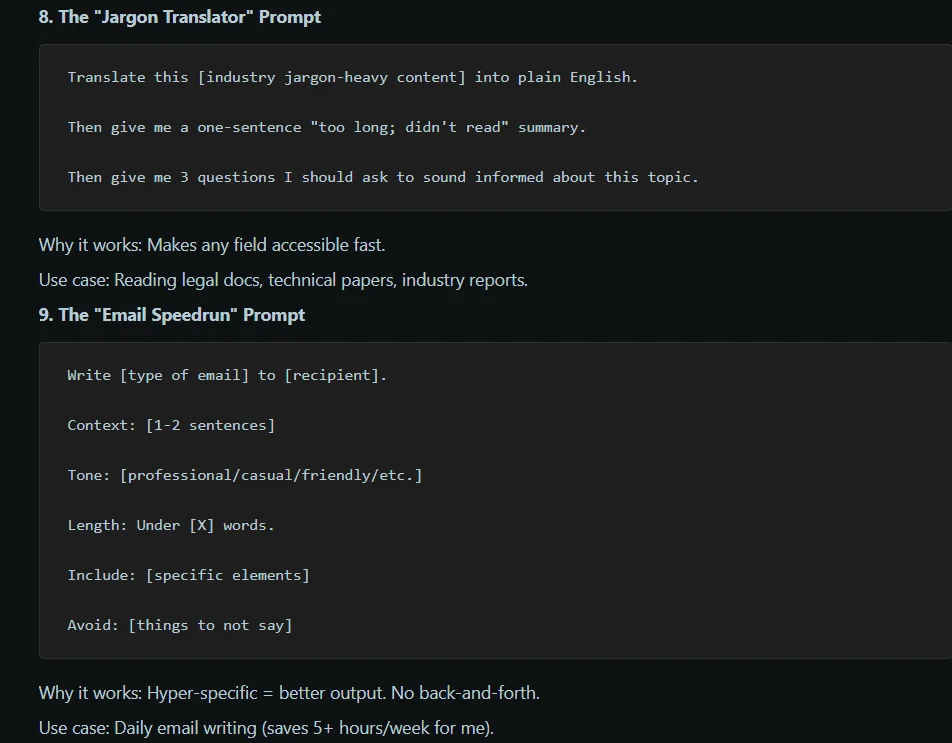
8. Jargon Translator
The ‘Jargon Translator’ does exactly what it sounds like.
It translates industry wording into simple, plain English.
9. Email Speedrun
Item number nine is called the ‘Email Speedrun’.
If you write daily emails, then this one will really appeal to you.
Input the type of email you want to send, tone, context, length, and things to say/not to say.
It works because it is hyper-specific.
It also saves you around five hours per week, according to the original poster.
10. Code explainer
At number ten is the ‘Code Explainer’.
This really only applies if you work with software coding.
Asking ChatGPT to explain the code to you, as well as what it does, how it works, and potential issues, can really help save time.
You can also ask the software how you would improve it.
11. Idea Stress-Test
Item 11 is the ‘Idea Stress-Test’ prompt.
Describe your idea, and ask the software to point out any fatal flaws with it.
It works because it picks out holes and issues before you start building.
12. Content Repurposer
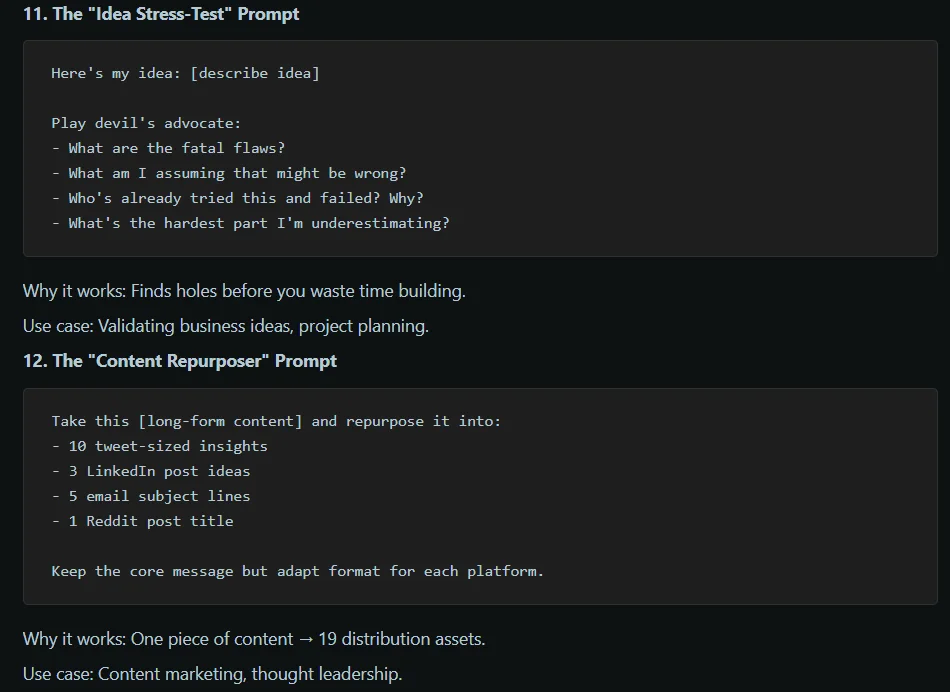
The twelfth prompt is the ‘Content Repurposer’.
Provide ChatGPT with a piece of long-form content.
Ask it to break it into:
10 tweet-sized thoughts, three LinkedIn post ideas, five email subject lines, and one Reddit post title.
Ask the software to adapt to each platform.
This provides you with 19 distribution assets from one piece of content.
13. The Learning Path
Number 13 is the ‘Learning Path’.
Tell ChatGPT what you want to achieve in a given timespan.
Ask it to provide week-by-week breakdowns, specific resources, and common mistakes to avoid.
It works because of the structured learning platform provided.
14. Analogy Generator
Number 14 is referred to as the ‘Analogy Generator’.
Pretty simple – ask ChatGPT to explain something complex using a familiar area to you.
Analogies – think ‘Life is a rollercoaster, with many ups and downs’ – make complex topics simple and memorable.
15. “Second-Order Thinking”
Last, but not least, ChatGPT prompt number 15 is called the ‘Second-Order Thinking’ prompt.
Ask the system what happens next after X happens.
Continue that chain of events for three-four steps.
This prompt focuses on future consequences and impacts of decision-making.
And it works because most people stop at first-order effects.
And there we have it – the top 15 prompts to use for ChatGPT.