Firefox just handed control back to users with a single toggle that wipes out every AI feature instantly
Published on Mar 02, 2026 at 9:29 AM (UTC+4)
by Claire Reid
Last updated on Mar 02, 2026 at 10:05 PM (UTC+4)
Edited by
Mason Jones


Mozilla Firefox has introduced a new function that allows you to completely remove all the AI features and integrations from the browser.
AI went from firmly existing in the realms of science-fiction, to being a very real part of everyday life.
The new technology is used across multiple industries, from medicine to robotics.
But if you’d rather cut down the amount of artificial intelligence in your life, then Firefox has introduced a handy new toggle.
DISCOVER SBX CARS – The global premium auction platform powered by Supercar Blondie
Firefox introduced AI features last year
Unlike many large companies, like Tesla and Microsoft, Mozilla Firefox didn’t rush to jump on the AI bandwagon.
In fact, it only introduced AI functionality at the end of last year.

Back in December newly-installed CEO Anthony Enzor-DeMeo said he wanted Firefox to ‘evolve into a modern AI browser’ and announced it would ‘support a portfolio of new and trusted software additions’.
In a press release at the time, the CEO noted that AI is already changing software and that over the next three years, the company would be ‘investing in AI that reflects the Mozilla Manifesto’.
However, the company also stressed that it believes ‘AI should always be a choice’ and that although it was introducing new AI features, it would also include a way to opt out of using them.
“AI is changing the web, and people want very different things from it,” the company said in an update.
“We’ve heard from many who want nothing to do with AI. We’ve also heard from others who want AI tools that are genuinely useful. Listening to our community, alongside our ongoing commitment to offer choice, led us to build AI controls.”
This is a little different from how some other companies are handling AI – there’s no way to completely remove the AI-powered Copilot from Windows laptop, for example.
Click the star icon next to supercarblondie.com inGoogle Search to stay ahead of the curve on the latest and greatest supercars, hypercars, and ground-breaking technology
Now it’s added a way to get rid of them with minimal effort – here’s how
Now a few months after announcing its AI intentions, Mozilla Firefox has launched its latest version and comes with that promised opt-out toggle.
To make use of the feature, you’ll need the latest update: Firefox 148.
Once you’ve got the update head to Settings and then AI Controls.
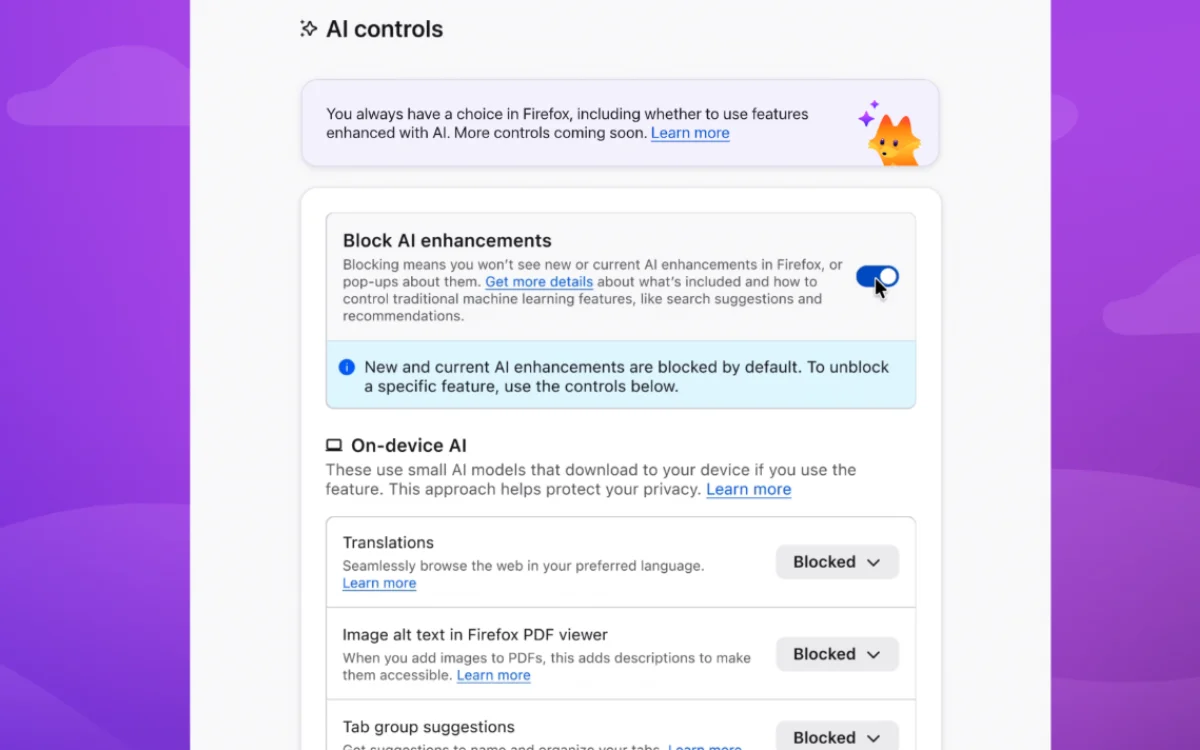
Inside this menu, you’ll find the main AI killswitch marked: Block AI Enhancements.
If you toggle this to off, you’ll no longer see any AI features when using Firefox, this means no more AI-powered link reviews, AI chatbot in the side bar, or automatic AI translations.
As well as the option to remove all AI features, the update will also allow you to pick and choose which ones you want with some extra toggles.
So, if you find the image alt text in the Firefox PDF viewer quite handy, you can toggle that back on, or you can keep hold of the smart tab group suggestions.
DISCOVER SBX CARS: The global premium car auction platform powered by Supercar Blondie
With a background in both local and national press in the UK, Claire has covered a range of topics, including technology, gaming, and cryptocurrency, since joining the editorial team at Supercar Blondie in May 2024. Her ability to be first to a story has been integral to making SB’s coverage of scientific discovery, AI, and global tech news a slick 24/7 operation.