This incredibly validating video shows it's not just you experiencing this very specific issue with typing on your iPhone
Published on Mar 12, 2026 at 5:59 AM (UTC+4)
by Claire Reid
Last updated on Mar 12, 2026 at 5:59 AM (UTC+4)
Edited by
Claire Reid
If you’ve recently noticed you’ve been regularly misspelling words when typing on your iPhone, you’re not alone – and this video proves it.
Each year, Apple releases its latest operating system bursting with cool new features.
However, some iPhone users have been left less than impressed after upgrading their device to iOS 26.
Across social media, people are complaining that their iPhone’s keyboard has suddenly stopped working as it should – and one man has even caught proof of it in action.
Click the star icon next to supercarblondie.com in Google Search to stay ahead of the curve on the latest and greatest supercars, hypercars, and ground-breaking technology
Have you noticed your iPhone keyboard behaving oddly? You’re not alone
We all make the odd typo when tapping out a quick message, but those who have recently switched to iOS 26 found it become a far more common problem.
People have noticed that tapping keys can result in the wrong letter appearing, words are popping up in the wrong order, and the keyboard is lagging.
Now, if you have been experiencing this you could have put down to you being a little clumsier than usual or getting distracted when you’re typing.
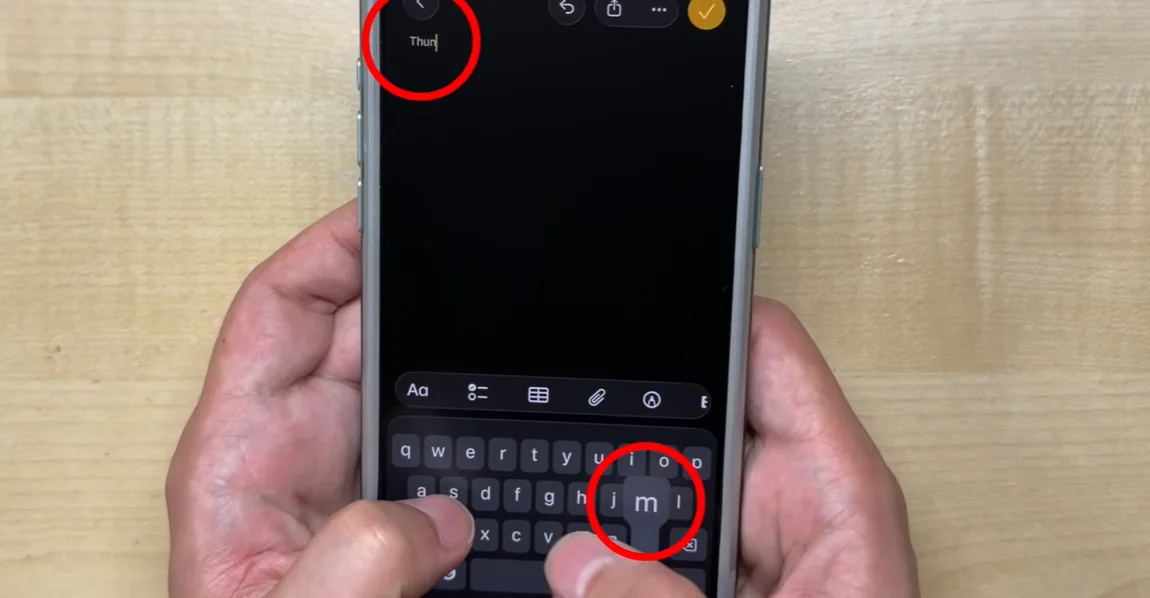
However, YouTuber, Michi NekoMichi, has managed to film the odd glitch in action – proving once and for all that it’s not in your head.
To test out the keyboard, he repeatedly typed out the phrase: “Thumbs up” and found that each time it was ‘misspelled one way or another’.
So, he decided to record himself typing and then slowed down the footage to see exactly what was going on.
In the clip, the YouTuber can be seen clearly tapping the letter U only for the letter J, even though, the iOS had detected the correct letter and highlighted it on the keyboard.

While it’s nice to have the issue confirmed, the YouTuber was unable to give a solid reason as to why it’s happening or how to fix it.
And although there are some iPhone users who have said the more recent iOS 26.3 update has fixed the glitch for them, that isn’t the case for everyone.
That isn’t the only issue that updating might cause, either
While the issue above is most likely a glitch that will eventually be fixed, there’s another unavoidable problem that comes with updating your iOS.
Although its recommended to ensure your iPhone is always running on the latest operating system, to keep it safe and secure.
A former Apple employee explained that updating to a new iOS will slow down your phone, especially if it’s an older device.
“Feel like your phone’s getting a little slow?” he asked in a clip shared on TikTok.
“Well, if it’s not an iPhone 14 Pro or higher, it is. Especially if you updated recently.”
He went on to explain that although newer operating systems may still work on older devices, they can still impact its performance.
DISCOVER SBX CARS: The global premium car auction platform powered by Supercar Blondie
With a background in both local and national press in the UK, Claire has covered a range of topics, including technology, gaming, and cryptocurrency, since joining the editorial team at Supercar Blondie in May 2024. Her ability to be first to a story has been integral to making SB’s coverage of scientific discovery, AI, and global tech news a slick 24/7 operation.