Hidden iPhone setting lets you run 120Hz in Safari to allow for a much smoother browsing experience
Published on Feb 17, 2026 at 9:33 PM (UTC+4)
by Jack Marsh
Last updated on Feb 17, 2026 at 9:33 PM (UTC+4)
Edited by
Amelia Jean Hershman-Jones
Improving every aspect of your online habits, this hidden iPhone setting is allowing internet users to run 120Hz in Safari, giving you smoother and quicker shopping, reading, and googling experiences.
With eyes glued to screens, we’ve placed more reliance on refresh rates than ever before.
It might seem like only a small matter to many, but iPhone users are often frustrated by the choppiness of Safari, the default search engine app.
But that’s all because Apple has been capping your browsing at 60hz – until recently.
VISIT SBX CARS – View live supercar auctions powered by Supercar Blondie
Hidden iPhone setting has been gatekeeping smoother web surfing
With iOS software upgrades, Apple has been ramping up its display, with Liquid Glass being a huge success.
But there’s still room for improvement, just as Samsung proved.
Thankfully, there’s actually a secret setting to help, especially on Safari.
Having been capped at 60hz, this hidden setting allows your screen refresh rate to be doubled, ending the choppy browsing woes at the expense of a bit of battery life.
The increased scrolling speed is rumored to have a heavy impact on your battery while using the browsing app, but it means that Safari is now equally as effective as the likes of Google Chrome.
Here are some other hidden iPhone settings that can combat battery depletion.
Click the star icon next to supercarblondie.com in Google Search to stay ahead of the curve on the latest and greatest supercars, hypercars, and ground-breaking technology
How to enable 120hz in Safari
If you fancy giving this a try, the hidden iPhone setting is buried deep within the logs, but we have you covered.
You can follow these steps below, or check out the video at the top of the article if you’re more of a visual learner.
- Open the Settings app.
- Scroll down and tap Apps.
- Tap Safari.
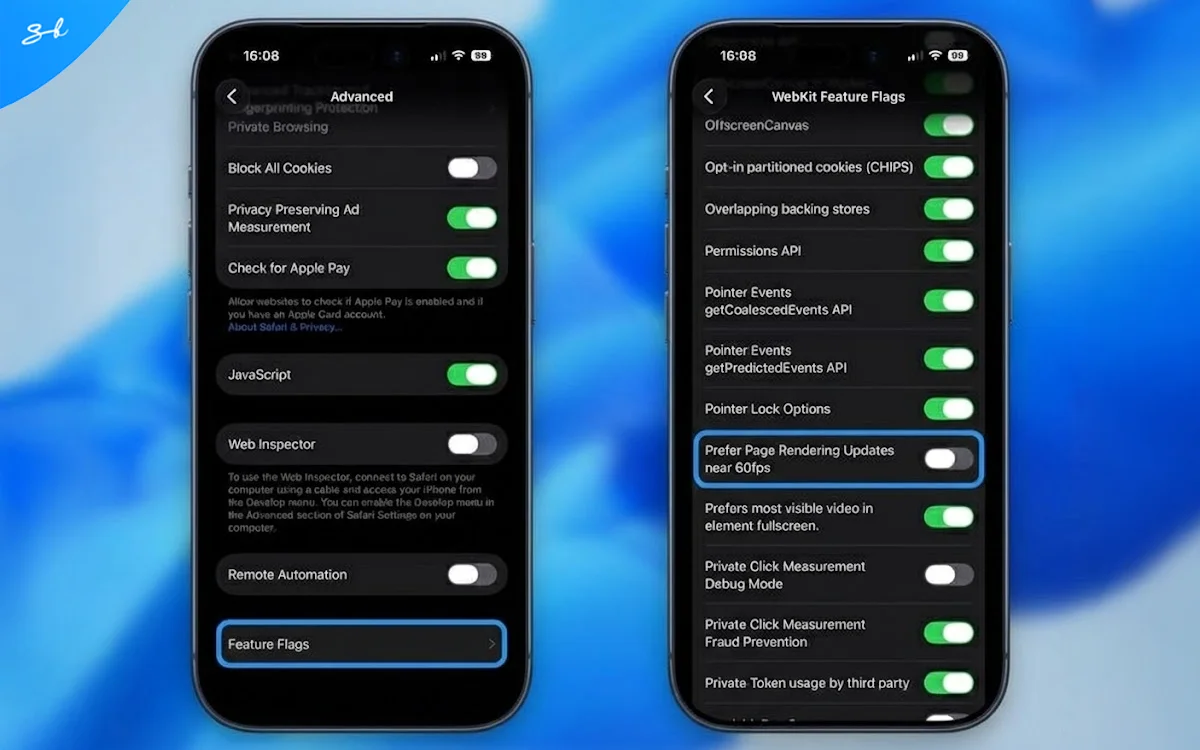
- Scroll to the bottom and tap Advanced.
- Tap Feature Flags at the bottom of the list.
- Scroll to Prefer Page Rendering Updates near 60fps and toggle it off.
- Force quit Safari and reopen it.
The Apple browser still has different pros and cons compared to the likes of Google Chrome, but enabling 120hz in Safari really does level the playing field for us serious scrollers.
DISCOVER SBX CARS: The global premium car auction platform powered by Supercar Blondie
After beginning his career writing about all things gaming, Jack joined the Supercar Blondie team in November 2024 as a Content Writer. Since joining SB Media, in addition to a love for covering emerging tech, he has developed an admiration for vintage restorations, particularly old American brands like Dodge and Ford.