iPhone users shocked as ‘undeletable’ Apple app secretly eats up to 20GB of storage
Published on Nov 14, 2025 at 2:09 AM (UTC-5)
by Jason Fan
Last updated on Nov 14, 2025 at 8:02 AM (UTC-5)
Edited by
Mason Jones


A newly discovered Apple bug has left many iPhone users outraged, after they discovered the pre-installed app quietly devouring huge amounts of storage.
Social media threads over the past few weeks have turned into miniature tech support groups as frustrated owners trade screenshots and horror stories.
With some reporting storage losses of more than 20GB, the mystery has sparked a wave of device checks from curious users.
And worst of all? You can’t even delete the app causing the chaos.
SBX CARS – View live supercar auctions powered by Supercar Blondie
The app causing the Apple storage problem
The culprit is an app that usually keeps to itself but has apparently developed a huge appetite for data.
Users on Reddit and other tech platforms first flagged the issue months ago, noting storage usage ballooning past 20GB for no clear reason.
So what app is to blame?
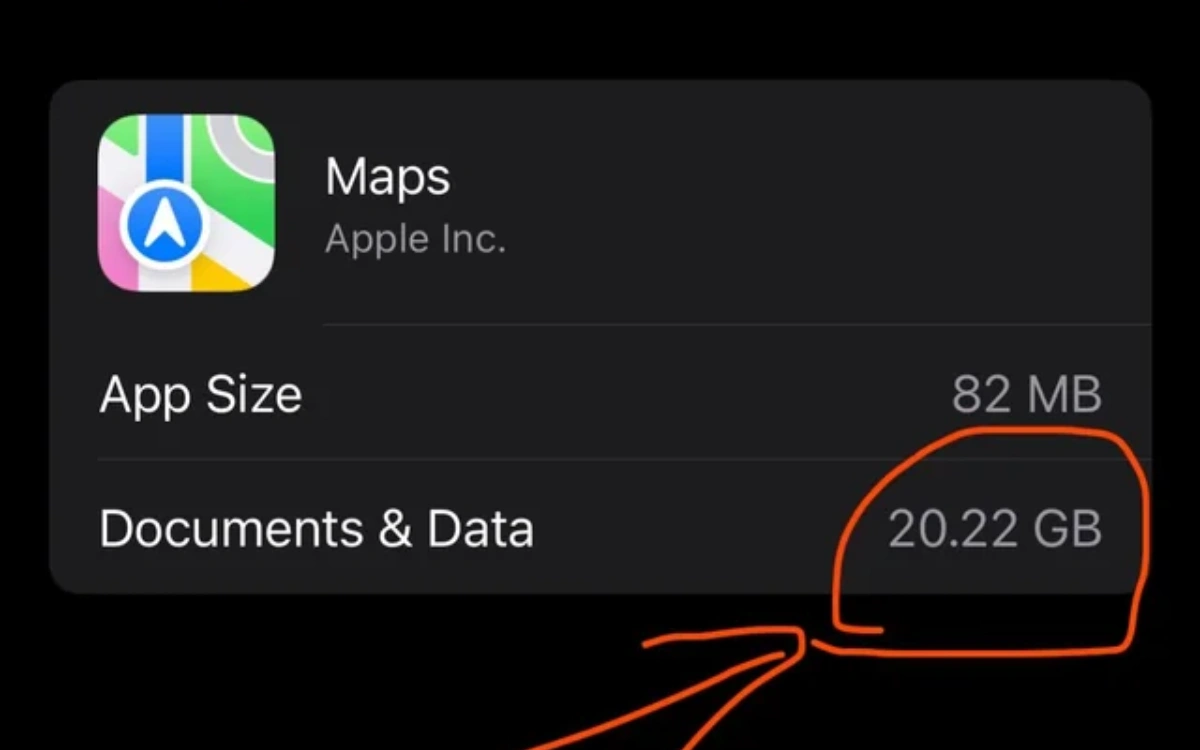
The app in question is none other than Apple Maps, and it turns out you can’t delete it.
Users have tried, but many faced an error asking them to select a different default mapping app, when the option doesn’t exist for them in their region.
They said updating the system didn’t fix the problem either.
Others have shared screenshots showing the app’s ‘Documents & Data’ category eating more than 20GB, while another poor soul discovered nearly 14GB mysteriously missing.
In fact, some people even reported that this Apple Maps bug is preventing them from updating to the newest iOS version entirely, due to lack of storage space.
This is quite problematic, given how many useful features are present in iOS 26.
To make matters worse, the usual tricks, like clearing frequent locations, don’t work for everyone.
The result: an app you can’t remove, hogging space you can’t reclaim.



How to fix the Apple Maps bug
Fortunately, some users have found at least one partial fix.
Clearing history can work…at least sometimes.
To try it, head to Settings > Privacy & Security > Location Services > System Services > Significant Locations & Routes > Clear History.
It’s not guaranteed, but given the alternative, it’s worth a shot.
If that doesn’t work, the only other reliable solution being reported is quite dramatic.
It involves a full factory reset, essentially wiping the phone back to square one.
It’s as inconvenient as it sounds, but it should evict the data-hungry Apple Maps once and for all.
For now, iPhone owners can only hope Apple rolls out an official fix soon.
Until then, keep an eye on your storage, because you never know when certain apps decide it’s time to snack on your storage.




